Showing posts with label monthly planning. Show all posts

5.21.2016

How work together my paper planners and Google Calendar with my apps?

If you didn't read my last post about how I use Todoist and Evernote - do it now first!
While the apps help keep me on track, with automation, reminders, quick collecting, I also need for planning the paper and pen. When I use them, I think differently, more deeply.
The whole planning system is like a zooming process.

Year

The farthest picture is the year for me.
I filled out the Powersheets - what helped me to crystallize my goals. But I don't really use the monthly sheets, I just read my goals through every months.
For my work I made a yearly plan (you can take a look on it in this video, by about 8 minutes). Both are written.

Month

I made a separate monthly calendar booklet for myself for the year. At the beginning I wasn't sure, if it is a good idea, but I needed more ring space, so monthlys has to be removed. I'm very satisfied with this solution. (For next year - advice for myself: use thicker paper! :)) This calendar is, where every time related things arrive. It lives in my main planner's pocket. I synchronize this with the calendar in my pocket - but only those things are going to my pocket what can influence appointments - "give pocket money for kids" is in A5 but not in pocket. When I'm on the go I bring only the pocket with me. If I have to make an appointment in my pocket, I don't write it on paper (I would forget to copy), I write it on little post it note, and that stays there until I didn't copied (I have a task in my daily review "check pocket".)
For work I have also monthly calendars, where I write deadlines, and plan out on what day on what big thing I will concentrate.


Week

When I do my weekly review, I copy all events to the Google Calendar, because I need reminders. Every new item in Google Calendar goes automatically to Todoist (with IFTTT), so I can see them in more place (sure, what sure). 

Day

The daily focus from the monthly plan goes to the daily page - what I also need to write. Even if I have my little tasks from Todoist... I copy my tasks from Todoist to my daily page! Not all, but most of them. I need to plan out, in which hour I do what. (Not too detailed, but like "daily routine", "write xy pattern", "phone calls", "little things".


It might be a little chaotic... A little summary:
Tasks are collected in Todoist. They are scheduled there according to paper planning. Tasks are copied to paper planner (daily pages).
Other stuff are going to Evernote. (Templates, routines, archive, supporting materials, project infos - no tasks! Pending items)
Appointments are going on paper planner, and are copied to Google Calendar.
Time-related items (my kids have today a sport competition - when, where, what they have to have.... - are going as a photo into Todoist [TICKLER] "project". 
All real planning happens on paper. Almost all information keeping happens on computer.

Read more…

4.26.2016

How to Use the Monthly Chart?

A monthly chart is a table with on column for tasks, or anything else :) and 30/31 columns for the days. In cells you can draw, check off, color, write.


1. Planning

I tried to use a monthly chart for planning before, but it didn't worked for me. Like: add tasks to the left column, and mark on which day you have to do this. I planned very well, just never checked :D 

2. Tracking projects

On the top of my chart I track on what project I'm working when. I want to summarize after couple of months to see, which type of project how many days need. As you can see, I color when I'm worked on something. My patterns stayes from more steps, where you see letters, means, where I am in the progress.

3. Tracking goals

On the bottom I mark, when I did something to my goals. When I have planned something on a day, I draw a square. As you can see, it is not going perfectly :D

4. Other ideas 

Weight loss

Write the weights to the rows, and mark every day, where you are.

Mood, other well being tracking

Write every day to every category how you rate it. Like 1-5 or 1-10...
You can also leave for something (headache) so many rows, how many value you want to use, and color so much, for how many you rate that day.

Keep track events

Mark no school days, your husband work schedule, trash days...

You can download this insert from my Etsy shop. For my readers I have 20% discount, use the SRBLOG coupon code!


Read more…

2.23.2016

Using stickers for planning, not for decorating

I love to spend lot of time with my planner, but what is too much, is too much. I'm always searching for solutions to automate things, or making it simpler.

Where and for what do I use stickers in my planner?

1. Monthly spread - recurring events
I have lot of thing what don't need to write, but it is good to remind me. I know, that I bring my smallest daughter to Hungarian School every Wednesday. I know, when to leave, when it is. But I have the sticker here, because when I make an appointment with someone, I might forget it.


2. Monthly spread - events, color coded, with icons
I just started to make my own stickers with my new Silhouette Portrait. I've chosen for all family member a color.


This way the sticker tells me without writing: who and where, and I have to write only the when. It spares me a lot of time and space.


3. Monthly spread - events, without icons
I don't have icon for any possible events, so I made a lot circle stickers too.


4. Recurring tasks not to forget
Like give pocket money to kids every first day of the month's.


5. Daily schedule - event sticker without icons
I love how the circle sticker pops out! More and more than only writing in, even if it is written with color.


6. Daily schedule - color coded with icons
There are events, what not influence my schedule, but I have to know, like one of my bigger daughter has an appointment. I place the sticker reminders on the right side of my schedule. Didn't found now one quick, but you can see above, how I placed such an event on my schedule.

7. Index page - type of the event
I try to write every important stuff, what I might have to remember later, when that happened. Here I have a different logic with the color coding. I have for all family members a separate sheet, and color codes mean different segment of life (like green is health, yellow is fun, etc.) This way is quick to find: when was my daughter last time by dentist? I don't need to read for that, only search the teeth icon.


This post is part of the planner experience link up party:

The Planner Experience

Read more…

12.08.2015

Rethinking my life

It's the last month of the year. I started preparing my planning system for the next year:
- printing?
- buying?
- planner inserts?
- planners?

My planned planning system for the next year looks like

1. my main planner will stay my purple A5 Filofax Malden, with monthly pages. I'm not sure in weeklies. I want them, but weekly and monthly is too much. Because a whole year weekly has no place in my planner, I need the monthlies for future planning. I have to figure it out. Plus in this planner: ideas, tasks (they are also ideas, like what I can do if I don't have too much energy), projects and informations.
2. I ordered a month daily planner booklet, I love it so far, and don't disturbs me, that it is separate. Why I ordered this? Because I don't want to use my time for printing and I didn't found any daily insert I would like to have. I also ordered a year day planner spiral notebook, what I got last week and it is only four month. Hahh, you should read first :D I think I will go with the one month dailies after I ran out from the 4 months, it fits into the back pocket of my Filofax. If I start to hate, that it is not an insert, I can cut it out and punch.
3. Business planner: A5 Filofax Malden. Monthly and weekly. Monthlies are not for appointments (because I don't have business appointments :)), but deadlines, planning working times, projects. Statistics, infos, etc in this planner.
4. Your best year 2016 Creative Business Planner. I started to read and fill out this planner for goal setting in my business. I placed the pages into my Filofax Clipbook, without it's monthly and weekly planning pages, I printed out my own monthlies. I can move the actual month always to the Malden.
5. My mental health is important, I will order the Powersheets, whatever it costs to me...
6. Daily Greatness Business Planner


Decisions

Last times I'm lost, what I should do, how my time should be organized. I'm a lot angry with my kids, I'm impatient. I decided, I work in December as few as possible, and spend more time with the kids and finding out what I want and at the end of course, I plan my next year. One question is if I want to write this blog and filming youtube further? On which level? As I see, I can't and want to be a "professional" planner. Too much planning in blogging is not for me, I'm more emotional. If I want write, I write, sometimes to find/make a nice picture for a blog post would be a setback in the way, so I have decide: will be a not so perfect blogpost, or there will be no? I say yes for the notsoperfect :) I hope you too!
I leave at the end, why I started to write this post at all. I got a comment here on the blog, where someone says thanks for me, and I got also a comment on YouTube on a video of mine. You might laugh: two comments can make you happy? And yes, from comments I know, writing this blog makes sense!

I'm say Hello for you. Do you hear me? Do you want me to continue?

Read more…

9.22.2015

How to build your perfect planner system? Week 16: Which calendar to use and which monthly format?

As we finished with the basics, we can move on, and adapt your system to your needs. First: calendar. If you have not too much appointments, monthly calendar can be enough. If you need more, use weekly also. Or only weekly. If you want more together, you might want a yearly insert for wider perspective (for holidays, travels), or even more, there is also 5 year overview! Let's see first the opportunities for the monthly calendar.

Monthly calendar

Monthly calendar has small space for the days, so if you have tons of appointments it can be small for you (another question, what size of planner you use...). But I never met before someone who would have so much. Why is a monthly calendar worthy? You can see at a glance your month. How much things you have in days next to each other? What deadlines? Holidays, etc. I use the monthly calendar for organizing my appointments, I write everything here what I know about the future, school stuff, doctor appointments, holiday, etc. In weekly layout come only copies from this. Because you have not too much space you might use shortcuts, as stickers, letters. You don't have to write here everything, find a place where you keep the connected informations, and mark those appointments somehow (I use a +), where are additional informations (like where, what to bring, what's the name of the doctor). If you use color coded stickers, or drawings for repeating things, you don't have to write anything. Like: paydays, swim course, cleaning...


I keep maybe a year of the monthlies in my planner.

Format:

1. mostly used the mo2p, this is what I also like (see mine above).
2. Filofax has this format, also month on two pages, what I do not prefer, because the visual clue is not too strong when weekend is.
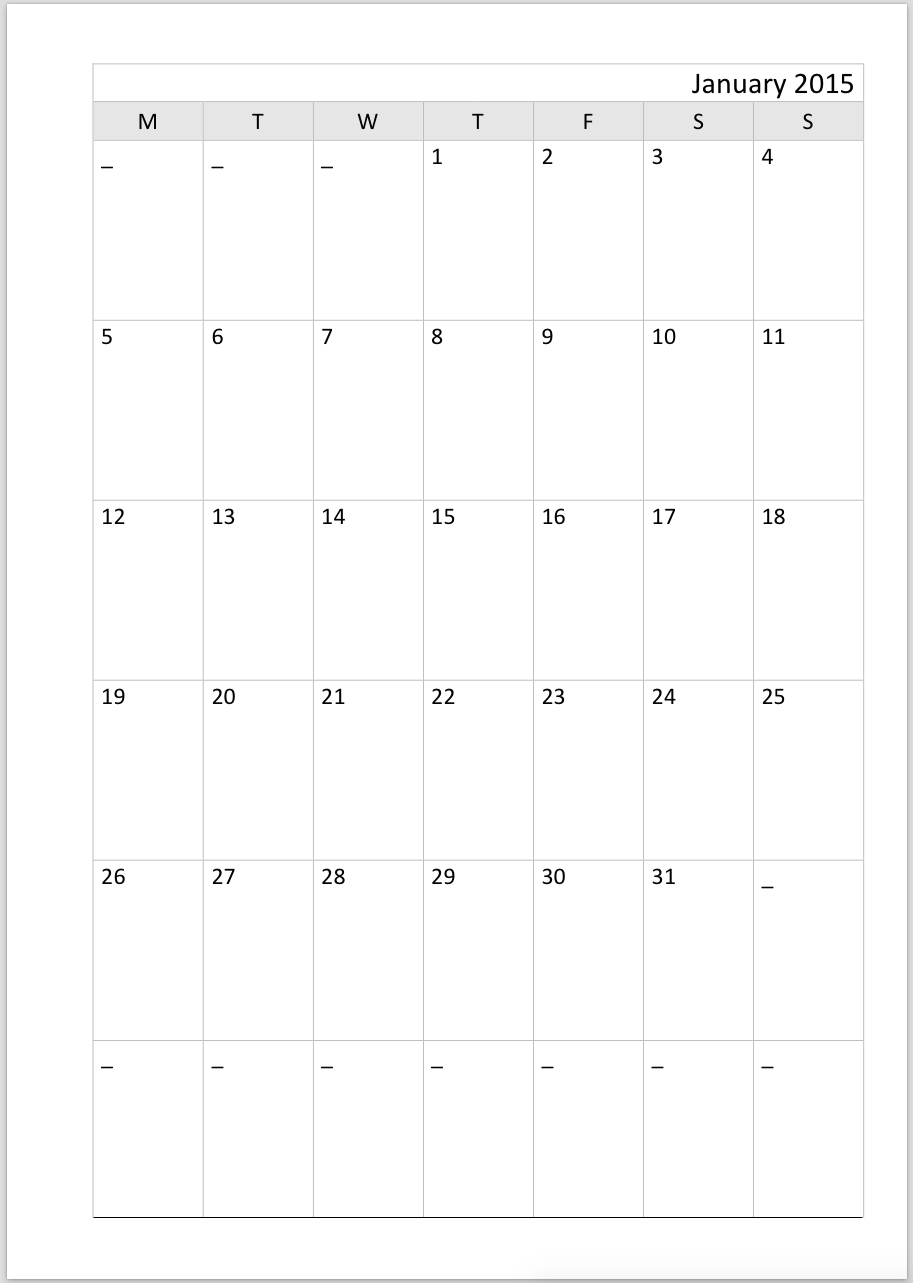
3. Mo1p - you can find a lot on the internet, but you have less space to write. This one from Philofaxy:

Source: http://philofaxy.com with permission

4. Horizontal version from Filofax, here you have place also for planning, or note taking:
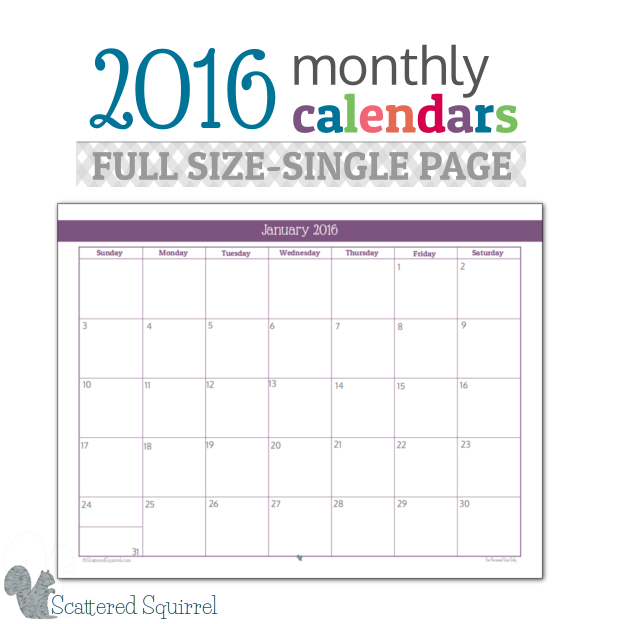
5. Horizontal mo1p is a good choice, if the rings disturb you. - example from Scattered Squirrel


Week start?

Not too much to talk about: decide, what works for you, Sunday or Monday.

Homework for next week

Think about if you need a monthly calendar or not? What format would be best for you? Maybe download some free versions for the internet in different formats and use it for the next couple of month to see, which one you like.
(You can download a lot different format from Philofaxy Blog.)

Next week I will write about weekly calendars.

------------------------------------------------------------------------------------------------------------------------

If you have any questions, please do not hesitate to ask in comment! Share your experiments in our Facebook group, and get more help!  

Find here the whole series.

Subscribe to our mailing list

* indicates required

Read more…

9.01.2015

How to build your perfect planner system? Week 13: First monthly review

One month is gone after you wrote your first monthly plan. The question is now, what happened? Did you finished everything what you wanted? Did life changed? Had you have to changed something? Could you predicted what you can finish in a month?

What is a monthly review?

It will take 1-2 hours, please schedule time for it! You have to revise everything: your yearly plan, your goals, projects, last month, changes in your life.

Steps of monthly review

1. Clean up your inbox

Hopefully there is not too much things here :) As a reminder, here is how to do it.

2. Make a frame for your upcoming month

Take a look into your monthly calendar: what will be happening in the near future? How much appointments do you have already scheduled? Are you planning vacation? How much responsibility do you have? Start to write to your monthly plan tasks/projects you must/want finish - related the calendar items. Deadline: it connects surely to a project. Birthday: Do you have to buy present? Do you have to organize something? 

3. Revise your goals

Are your goals still actual? If not, rewrite them! Write tasks to the monthly planner connected to your goals.

4. Revise your yearly plan

You could have adjust it, if you should make changes in your goals, if you hadn't predicted what you can do in a month and you didn't finished something or something came up. Write the tasks for this month from the yearly plan to the monthly.

5. Review your projects

Actualize your projects list, you might finished some in the last month, or created some new one. Go through the project pages: check if you marked all finished tasks, steps, if not, do it no. Actualize your task lists. Decide on which project you will work in the next month.

5. Last month

Review the last monthly plan: have you finished everything? What not, is still actual? If yes, plan it for the next month.

6. Write in your recurring tasks

It worth to create a list for things happens/has to do every month. I have to pay bills every last week of the month. I make the same promotion on the first week of the month. Presumably you have also similar things.

7. Make the plan!

I highly recommend to portion out them to the weeks, as I showed in the monthly plan post. But of course, you can make a simple list also. Or thematic. 
Homework for the next week
Make your first monthly review. Please share with us your plan in the From Chaos to Order Facebook group!


If you have any questions, please do not hesitate to ask in comment! Share your experiments in our Facebook group, and get more help!  

Find here the whole series.

Subscribe to our mailing list

* indicates required

Read more…